
The quickest way to remove vocals from a song is to upload the best copy you have to an AI vocal separator, ask for the instrumental, check the loudest chorus for leftover singing, then download it as WAV. Before you do that, it is worth two minutes to check whether you need a file at all, and whether an official instrumental already exists. Both can save you from a worse result.
First, decide what you actually need
You only want to sing along at home. You may not need a file. Apple Music Sing lets Apple Music subscribers turn the vocals down while a song plays, on supported iPhone, iPad and Apple TV models. It works inside the app only: you can't export the result, edit it or use it in a video.
You need a backing track you can play anywhere, for a karaoke night, a cover, a rehearsal or a video. Search for the song title plus "instrumental" or "karaoke" on the streaming services and stores you use. Many releases come with an official instrumental. The official instrumental of a song is made from the original multitrack, so it will always sound cleaner than anything separated from the finished mix.
There is no instrumental version. Then you have to make one yourself. There are two ways to do it, and they give very different results.
Why the old vocal-removal trick usually sounds hollow
Before AI separation, vocal removers used phase cancellation. In most stereo mixes the lead vocal sits in the centre, so it is identical in the left and right channels. Flip one channel and mix them together, and whatever is identical cancels out, voice included.
The problem is that the voice is not the only thing in the centre. The kick drum, the snare and the bass usually sit there too, so they disappear or thin out along with it. The vocal reverb is spread across the stereo field, so it doesn't cancel and stays behind as a ghost. Harmonies panned left and right stay as well. And the trick needs a true stereo file: on a mono recording, or on a stereo file that is really mono, there is no difference between the channels to work with.
If you have used Audacity's "Vocal Reduction and Isolation" effect, that is the method it uses. Many tutorials still tell you to find it in the Effect menu, but since Audacity 3.5.0 it no longer ships with the program. You have to download it separately as a plugin, and Audacity's own manual recommends its AI plugins instead.
How to remove vocals from a song with AI separation
An AI separator doesn't cancel anything out. A model trained on songs where every instrument was recorded separately learns what a voice sounds like, and rebuilds the song as two tracks: the vocals, and everything else. Because nothing is subtracted, the instrumental keeps its drums and bass. For most people asking how to make a song instrumental, this is the method that works.
Here is how it works with the Voice Music Separator on this site. The steps are much the same in other online separators.
1. Start from the best copy you have
The separator can only work with what is in the file. A WAV or FLAC keeps more detail than a low-bitrate MP3, and much more than audio ripped from a video that has been compressed several times. You can remove vocals from an MP3, and it usually works well, but if you also have a lossless copy, use that.
Trim the song to the part you need first. Credits are counted per minute of audio, so there is no reason to process a two-minute outro you won't use.
The tool takes MP3, WAV, M4A and FLAC files, and MP4 videos (it takes the audio out of the video). A file can be up to 10 minutes long on a free account, a credit pack or the Basic plan, 20 minutes on Pro and 30 minutes on Studio.
2. Upload the song and choose "Remove vocals"
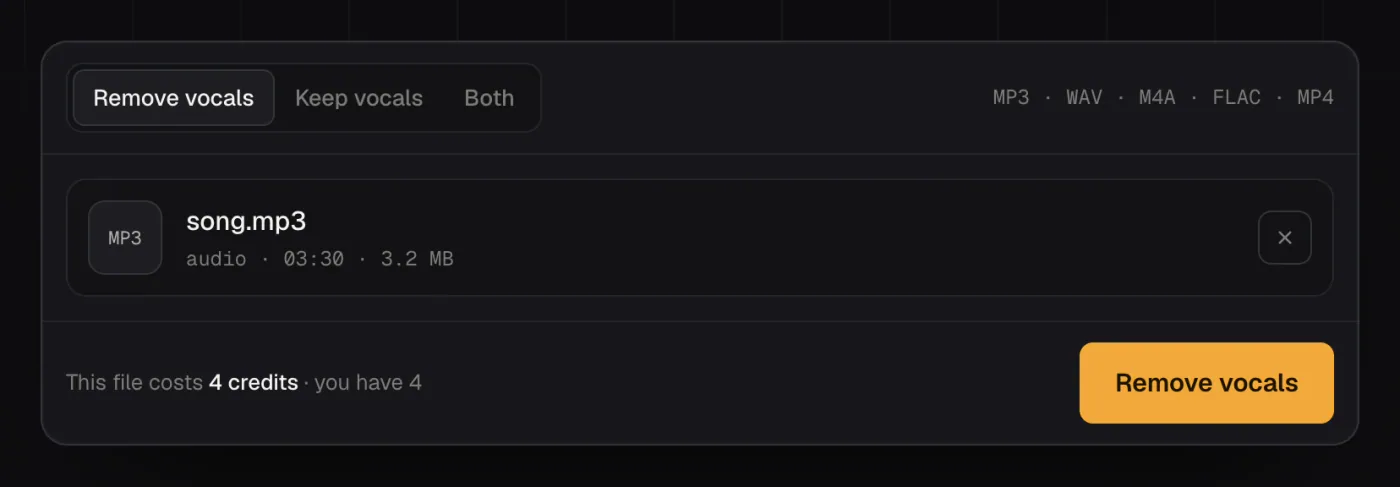
Drop the file on the upload card and keep Remove vocals selected to get the instrumental. The other two options are Keep vocals, which gives you the acapella if you want to isolate vocals from a song instead, and Both, which gives you the two files for the same price.
The page shows the cost before you start: one credit per minute of audio, rounded up per file. A 3:30 song uses 4 credits. New accounts get 5 free credits once the email address is verified, and if a file fails to process, its credits go back to your balance automatically.
3. Listen before you download
Don't judge the result by the first few seconds. Skip to the loudest chorus, where the voice and the band overlap the most. That is where any leftover singing shows up. Then listen to the end of a phrase, where a long reverb tail can leave a faint trace of the voice.
If you want to hear what a typical result sounds like first, the Voice Music Separator page has a 30-second pop chorus you can switch between the original, the instrumental and the isolated vocals.
4. Download WAV or MP3
Download WAV if you will record over the instrumental, edit it or mix it. Download MP3 if you just want to play it or send it to someone. Files are deleted after 7 days, so keep your own copy.
Remove vocals for free: Audacity's AI plugin
If you would rather run everything on your own computer, Audacity's free OpenVINO plugin includes AI music separation with a "2 stem – Vocal and Instrumental" mode. According to Audacity's vocal remover page, it is free with no limits, but it currently supports Windows and Linux only. On a Mac you are left with the older phase-cancellation effect, which you now have to download as a plugin.
It takes more setup than an online tool: you install Audacity, install the plugin, then run the separation on your own machine. In return there is nothing to pay for.
The four ways compared
| Method | Gives you a file | How it sounds | Cost and setup |
|---|---|---|---|
| Apple Music Sing | No, in the app only | Vocals turned down, not removed | Apple Music subscription, supported device |
| Official instrumental | Yes | The real backing track | Exists only for some songs |
| Phase cancellation (old Audacity effect) | Yes | Often hollow, bass and drums thinner, reverb left behind | Free, needs a true stereo file |
| AI separation (Audacity plugin or online tool) | Yes | Drums and bass kept, traces of voice possible | Free plugin on Windows/Linux, or credits online |
When vocals are still left in the instrumental
Some songs are harder to remove vocals from than others, whatever tool you use:
-
Heavy reverb or echo on the voice. A faint ghost of it can stay in the instrumental. If the song exists in another version, such as an acoustic take, try that one too.
-
Backing vocals, harmonies and choirs. These count as vocals and are removed together with the lead singer. A two-track split can't keep the harmonies and drop only the lead.
-
Live recordings. The audience singing along, microphones picking up the stage and the hall's reverb all make the voice harder to pull out cleanly. A studio version almost always separates better.
-
A poor source file. Low-bitrate audio already has artefacts, and separation makes them easier to hear. Find a better copy rather than processing the same file again.
How to make a karaoke track from the instrumental
The instrumental is the karaoke track: the original band with the singer removed. For singing at home, that file is all you need. A karaoke video with scrolling lyrics is a separate job you do in a video editor, putting the instrumental under the lyrics.
Two things help before you sing or record over it. Find the song's key with the Key and BPM Finder so you know whether it suits your voice, and if you are learning a fast part, slow the instrumental down with Slowed + Reverb: turn "Pitch follows speed" off so the key stays the same, and turn the reverb down. Both run free in your browser.
If you need more than two tracks, for example a backing track without the drums for a drummer to play along with, use the Stem Splitter, which splits a song into 4 or 6 stems so you can keep or mute each instrument.
Can you use the instrumental publicly?
Removing the vocals doesn't change who owns the song. The instrumental is still the original recording with one part taken out, and the composition still belongs to its writers. Using it for practice, private karaoke or a remix you keep to yourself is one thing. Publishing a cover or a remix built on it usually needs permission from the rights holders, and platforms like YouTube have their own rules for covers. This isn't legal advice: if you plan to release something, check the licence for that song.
If you have checked for an official instrumental and there isn't one, run the song through the Voice Music Separator, listen to the chorus, and download the WAV.